Independent Project · UX/UI Design

Building a component library for AI Experiences

A research-driven component library addressing trust, transparency, and control challenges in AI-powered experiences (in a healthcare context).

Role UI/UX Designer
Duration 12 weeks
Industry Biotech
12
Components Designed
40+
Component States
15+
Products Analyzed
6
Experience Types

Designing AI Experiences

Our team designs AI-powered experiences for both internal and external users. As AI became a growing part of our work, there was a need for a shared foundation for how to design these experiences responsibly and consistently.

Each new AI feature risked being approached differently, without clear guidance on critical questions like: How should uncertainty be communicated? When should the system defer to a human? How do we maintain user trust when AI outputs may be incomplete or incorrect?

In high-stakes environments like healthcare and manufacturing, these decisions carry real consequences. An AI system surfacing incorrect medical eligibility information or making the wrong operational recommendation could impact safety, trust, and outcomes.

While leading AI products like ChatGPT, Claude, and GitHub Copilot demonstrate effective patterns, these approaches are often tailored to their own ecosystems. We needed a centralized, systematized framework adapted to our context and constraints.

This created an opportunity: define a scalable foundation for designing trustworthy AI experiences in preparation for when inconsistencies and risks inevitably emerged.

AI Design System Overview

Complete component library overview showing 12 components organized into 4 functional categories

Methodology

Research before design

Rather than jumping straight into Figma, I focused on understanding the underlying problem space. This meant studying why existing AI patterns exist, what risks they address, and where they fail.

This wasn’t aesthetic design, it was systems design grounded in risk analysis and industry research.

Research before design

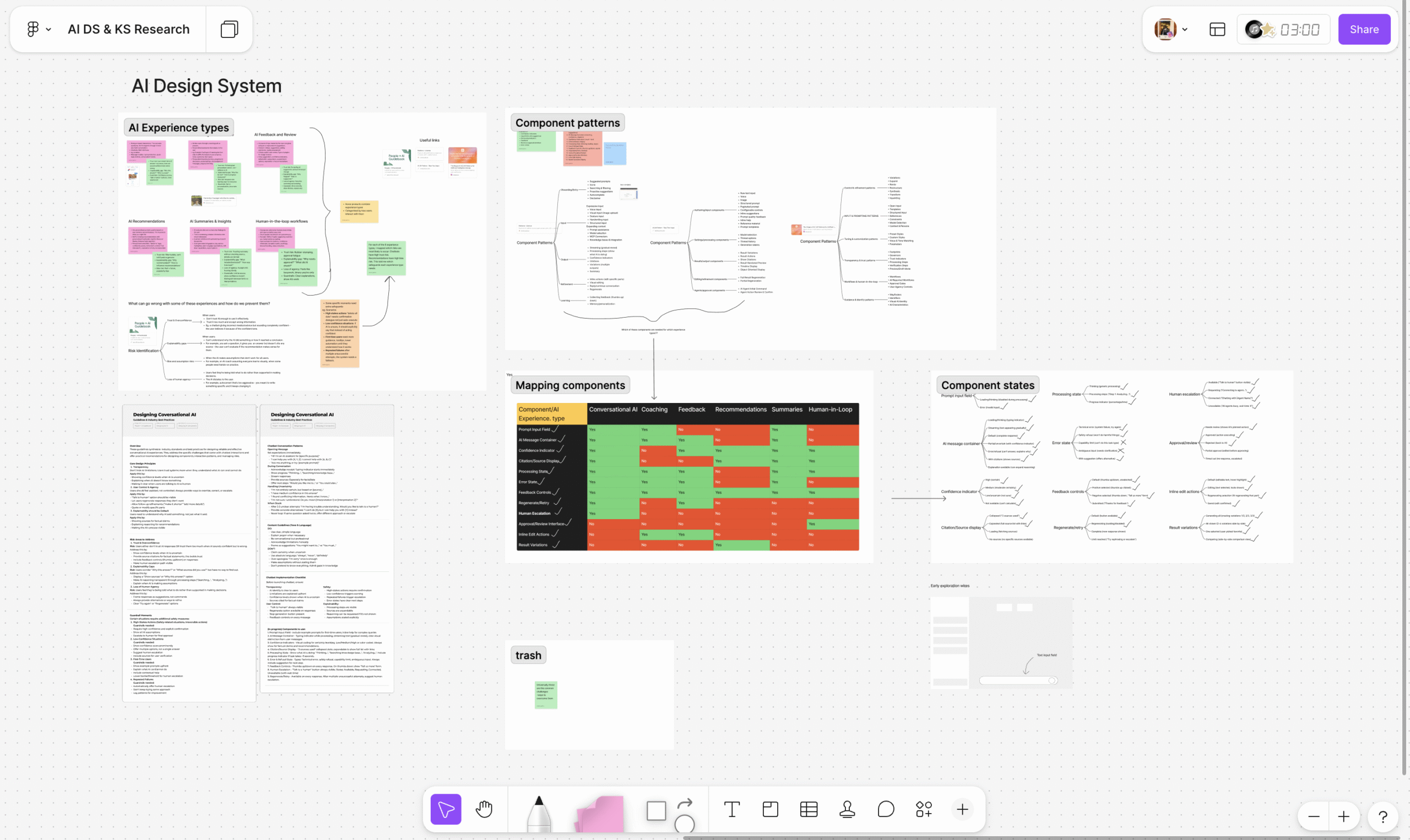
Research synthesis across AI products, risks, and recurring interaction patterns.

1

Experience Type Taxonomy

I defined six core AI experience types: Conversational AI, Recommendations, Coaching & Guidance, Human-in-the-Loop, Feedback & Review, and Summaries & Insights.

Key insight: Each experience type carries fundamentally different risks. Conversational AI raises trust and overreliance concerns. Recommendations surface bias and assumptions. Human-in-the-loop flows risk approval fatigue and disengagement. This classification created structure for designing context-aware solutions.

2

Risk Mapping Framework

Using Google PAIR’s AI risk framework, I mapped failure modes to each experience type. I identified five primary risk categories: Trust & Overconfidence, Explainability Gaps, Bias & Assumptions, Loss of Agency, and Approval Fatigue.

Why this mattered: This became the foundation for decision-making. Every design choice and component was tied to a specific, documented risk.

3

Competitive Pattern Analysis

I analyzed 15+ leading AI products including ChatGPT, Claude, GitHub Copilot, Figma AI, and Canva AI, alongside three industry pattern libraries.

Key finding: There is strong consistency across successful AI products. Confidence indicators appeared across multiple tools. Source citations were nearly universal. Feedback mechanisms were standard. These patterns are not optional or random, they are the baseline for building trust in AI systems.

4

Strategic Component Selection

From this research, I extracted 12 reusable components and grouped them into four functional categories: Trust & Transparency, User Control & Agency, Input & Output, and Error Handling.

Each component had to meet three criteria: address a mapped AI risk, appear across multiple real-world products, and apply across multiple experience types. This ensured the system was both grounded and scalable.

5

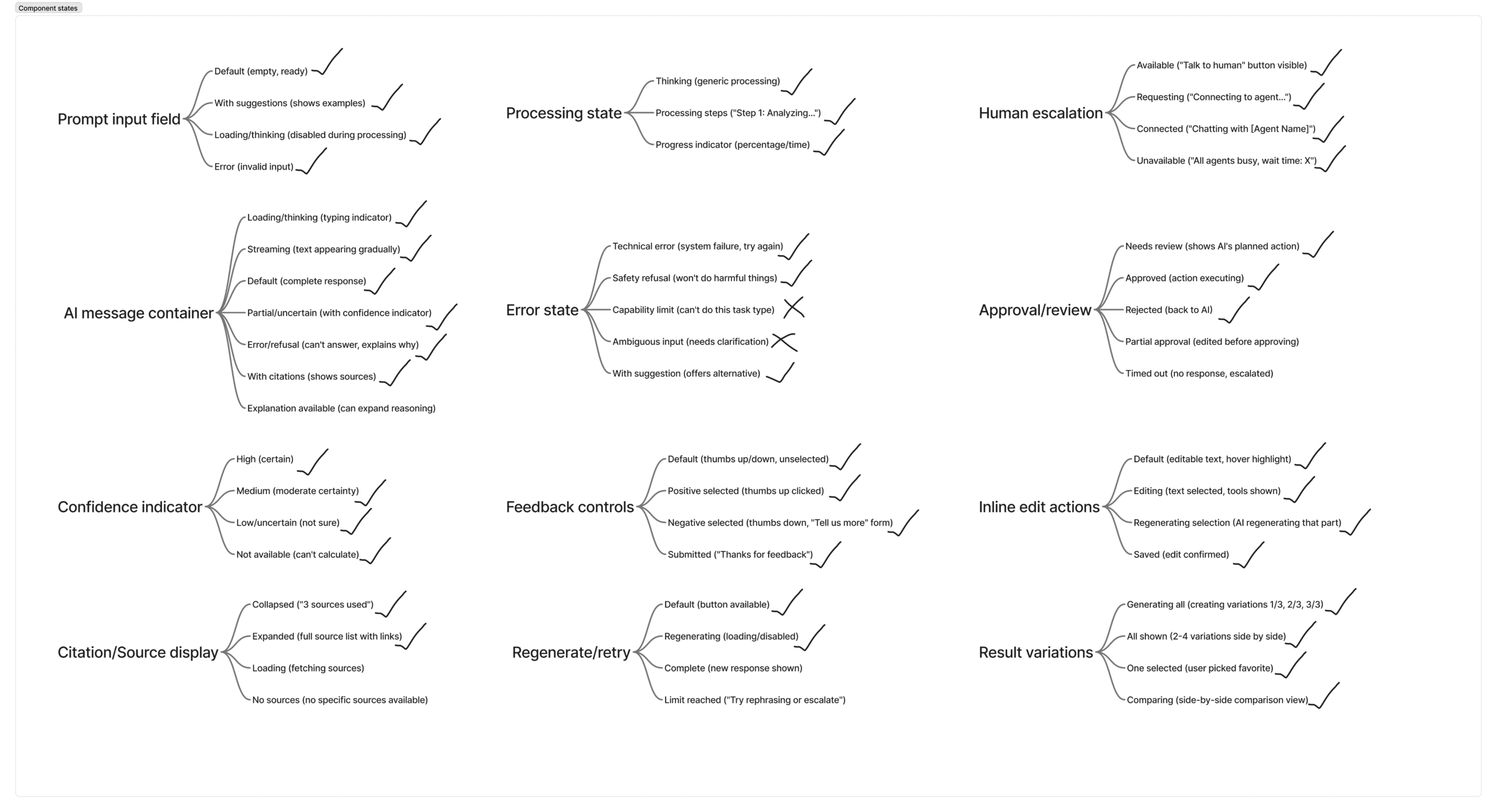
Multi-State Design System

AI systems are probabilistic and inherently uncertain. Designing only for ideal outcomes would ignore how these systems actually behave.

Each component was designed with multiple states to reflect uncertainty, partial outputs, errors and recovery, and human escalation.

Shift in approach: Traditional UX focuses on a single happy path. AI UX requires designing for variability, failure, and continuous state transitions.

Risk-Driven Design Philosophy

Every component in this system is intentionally designed to address a specific, documented AI failure mode.

Confidence indicators address the “trust paradox,” where users either over-trust confident AI responses or dismiss them entirely. Source citations respond to the reality of AI hallucinations, giving users a way to verify outputs. Human escalation pathways acknowledge the limits of AI and ensure users have a clear path to regain control when needed.

This approach grounds design decisions in risk, not intuition, ensuring that every pattern serves a functional purpose in building safe, trustworthy AI experiences.

Risk Mapping Results

Systematic analysis of primary risks per experience type using Google PAIR framework:

Experience Type Primary Risks Identified
Conversational AI Trust & Overconfidence, Explainability Gaps
Recommendations Bias & Assumptions, Loss of Agency
Coaching & Guidance Trust, Explainability, Overconfidence
Human-in-the-Loop Approval Fatigue, Loss of Agency
Feedback & Review Trust, Explainability
Summaries & Insights Trust, Bias, Explainability Gaps

Solution

A Scalable AI Design System

12 core components and 40+ states designed to support consistent, trustworthy AI experiences across use cases.

90+ patterns. 12 strategic components.

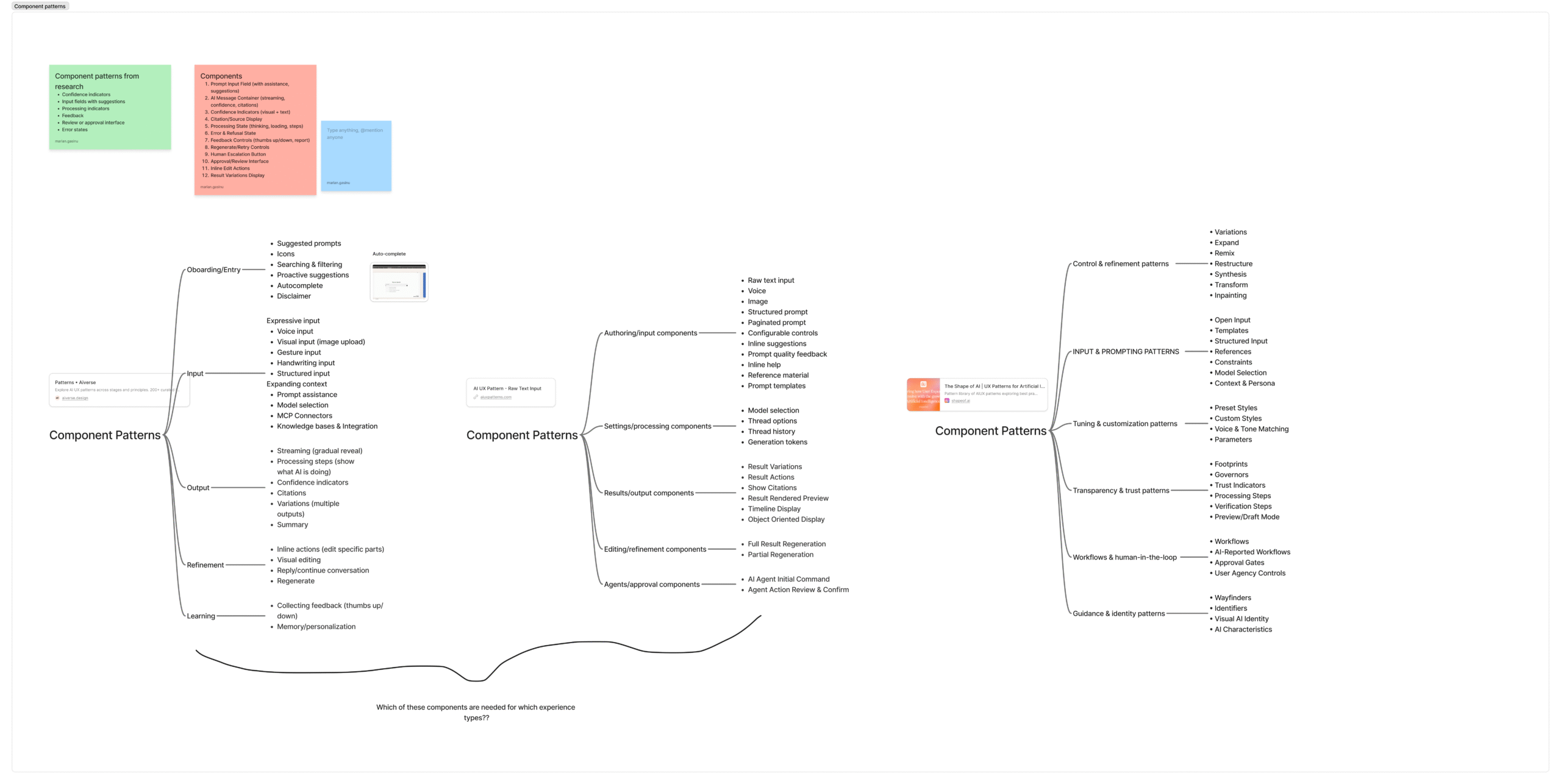
From 90+ Patterns to 12 Strategic Components

The competitive analysis yielded over 90 distinct UI patterns across the 10 products and 3 pattern libraries I studied. The challenge wasn't finding patterns—it was determining which ones were essential.

Strategic Selection Process

I evaluated all 90+ patterns against three criteria:

1. Risk Coverage: Does this pattern address a mapped AI risk from the PAIR framework?

2. Cross-Industry Validation: Does this pattern appear in multiple products solving different problems?

3. Multi-Context Applicability: Can this pattern work across multiple AI experience types?

Patterns that met all three criteria became components. Patterns that met only one or two were documented as variations or implementation details.

90+ components

90+ components

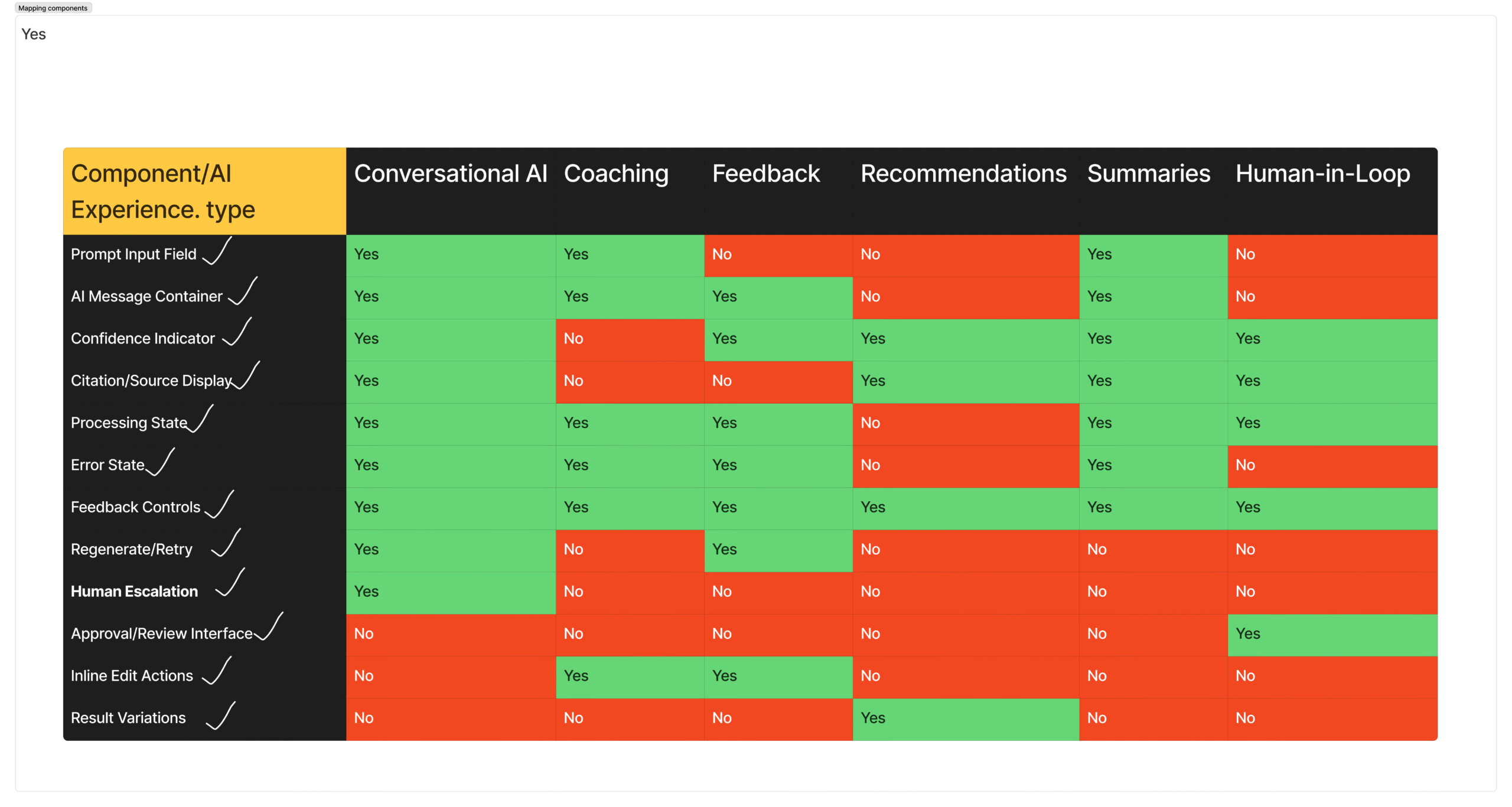
Mapping components with experience types

Mapping components with experience types

The result: 12 components that address all 5 primary AI risks across all 6 experience types. Not the most components, the right components. Each one earns its place by solving a documented problem across multiple contexts.

Component Risk Addressed Products Using It Experience Types
Feedback Controls Trust & Improvement 9 of 15+ All 6
Processing States Explainability 10 of 15+ 5 of 6
Confidence Indicators Trust & Overconfidence 8 of 15+ 5 of 6
Error States Recovery & Error Handling 10 of 15+ All 6
AI Message Container Core AI Response Structure 8 of 15+ 4 of 6

What didn't make the cut: Patterns that were product-specific, aesthetic variations that didn't change functionality, or patterns that addressed edge cases rather than core risks.

12 components and 42 states

12 components and 42 states organized to support risk-aware AI experiences.

Building the components

Translating research and risk frameworks into tangible, reusable components that operationalize trust, transparency, and control in real-world AI interactions.

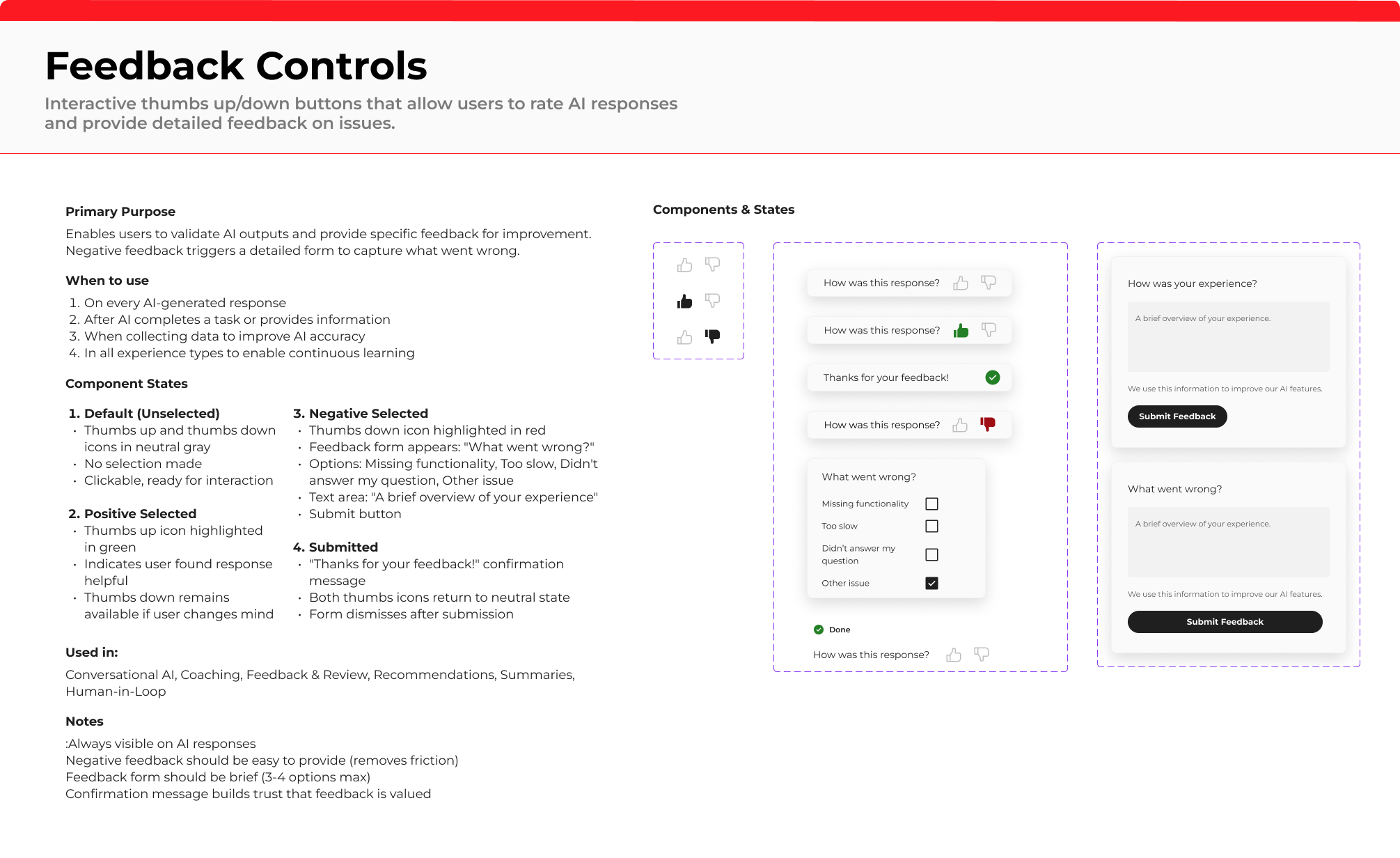
Feedback Controls component preview

Feedback Controls - Allow users to respond to and shape AI output.

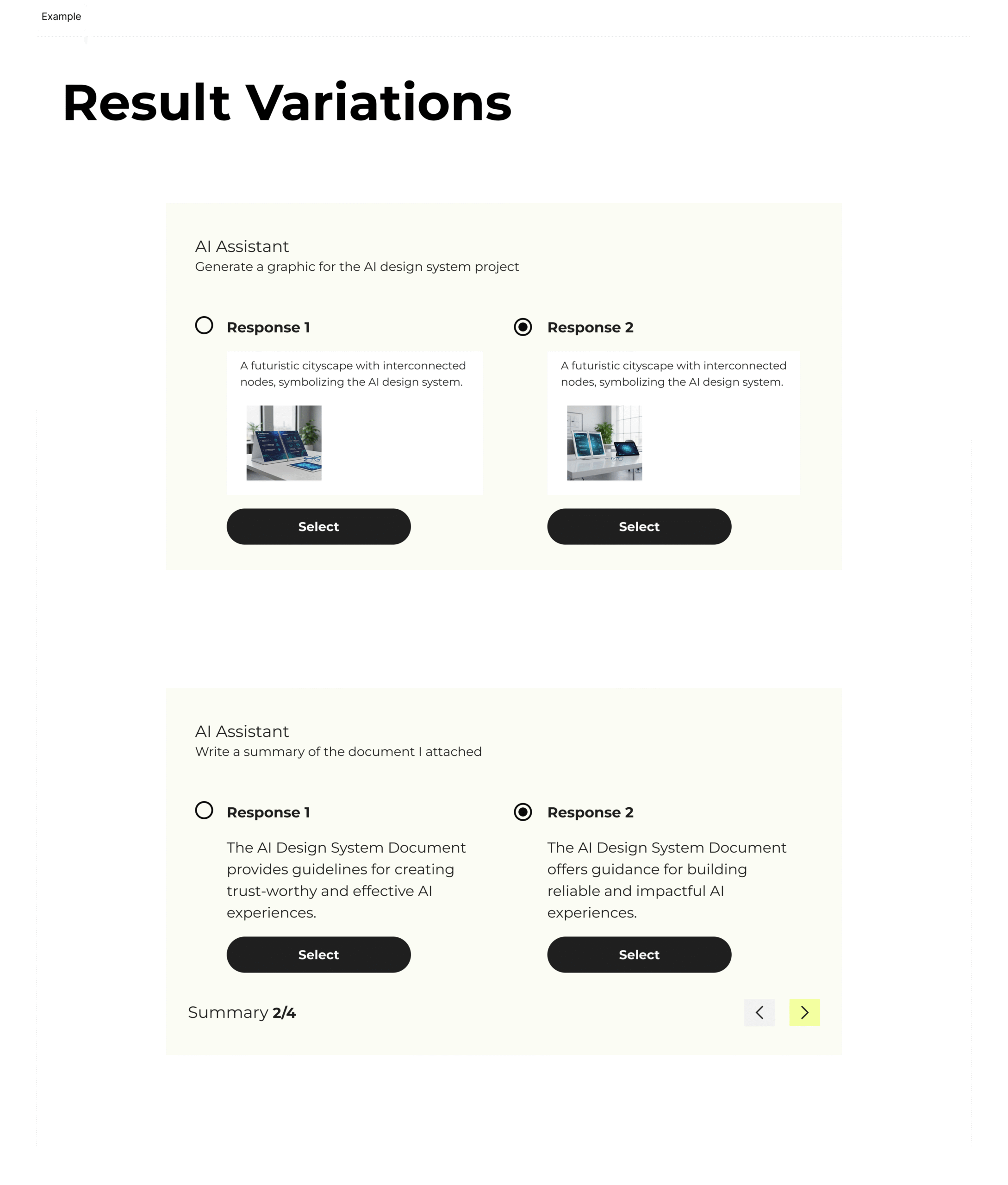
Result Variations component preview

Result Variations - Compare multiple AI-generated options side by side.

Component Examples

How each component works and when to use it

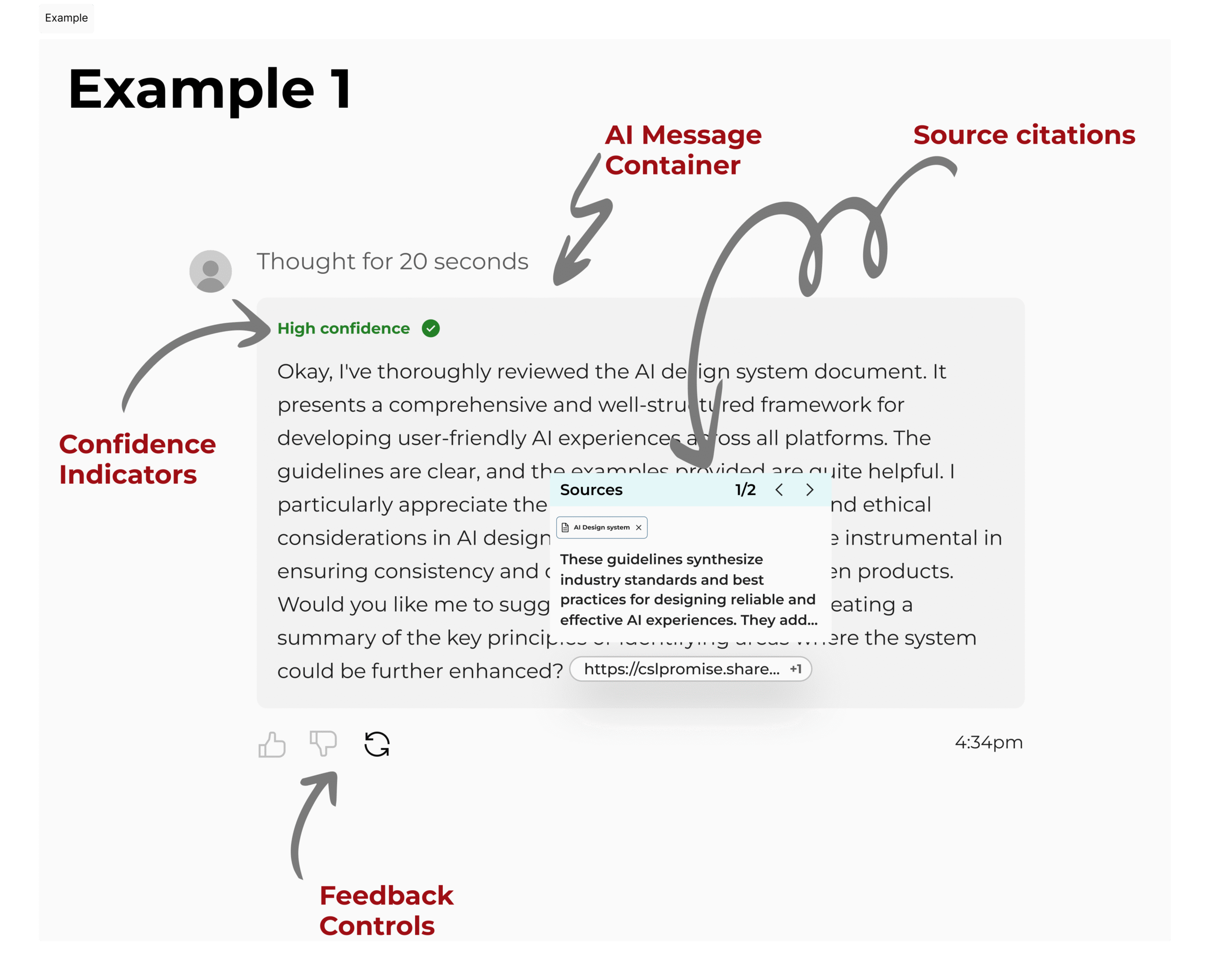
AI component example

A single flow showing multiple components working together.

This example shows four of the components working together inside one AI interaction.

AI message container shows the AI response, confidence indicator communicates the AI’s level of confidence, source citations reveal what the AI used, and feedback controls give the user a chance to respond.

Transparency also shows up in the “thought for 20 seconds” text, which makes the processing state visible instead of hiding it behind a static answer.

The Meta-Connection

While studying AI design tools and building AI experiences, I realized they share the same core challenge: trust. Designers using AI tools face the same tension as end users, balancing speed with skepticism. Many question the accuracy of AI outputs, yet continue to rely on them in their workflows. This mirrors the exact dynamic in AI products.

The solutions are identical: transparency about limitations, calibrated confidence indicators, giving people control, and always showing your work. Tools and products need the same trust architecture.

Impact & Outcomes

Impact that scales

Designed and delivered 12 reusable components and 40+ states, creating a foundation for consistent, trustworthy AI experiences across projects.

For the Team

  • Accelerated development time across projects
  • Shared vocabulary for AI UX challenges
  • Clear decision-making framework
  • Improved cross-project consistency
  • Established a reusable, living knowledge base for AI UX patterns and decisions, enabling the team to reference and apply them across projects.

For Users

  • More trustworthy AI experiences
  • Greater control over AI interactions
  • Better understanding of AI capabilities
  • Clear path to human support when needed
  • Reduced confusion and frustration

What this project taught me

Research before design

Spending weeks analyzing products and mapping risks felt slow, but it created the foundation for every decision that followed. Without that rigor, the system would have been inconsistent and reactive.

Learning from production systems

Instead of inventing patterns, I studied what already works at scale and adapted those patterns to our context. This grounded the work in reality, not assumption.

Designing for uncertainty

Traditional UX focuses on a single happy path. AI systems require designing for multiple outcomes, failure states, and recovery. This shift shaped how I approached every component.

Intentional system building

Not every pattern made the cut. I prioritized components that addressed real risks, appeared across proven systems, and could scale across use cases. This ensured the system remained focused and usable.

Big takeaway

AI design is less about creating new interfaces and more about designing for trust, uncertainty, and human control.

Request full Figma file / component library
Overview 0%